Every invoice, quote and credit note you send gets its own sequential number. Milo assigns that number at the moment you send the document, not when you create it.
A draft has no number yet
While a document has the status Draft, the place where the number normally sits reads Draft: in the list, at the top of the document, on the PDF and in the file name when you download it. In the edit screen, Invoice number says the number is assigned when you send the document.
As soon as you send, the document gets its number and you see it everywhere.
Why only when you send
Your numbering has to run consecutively, without gaps. If a document were numbered at creation, every draft you threw away would leave a gap in your series, which is exactly what the tax authority does not want to see.
A draft now consumes no number. Throw a draft away and nothing about your series changes. If sending fails somewhere along the way, Milo rolls the number back, so the next document simply gets it.
Where you set the numbering
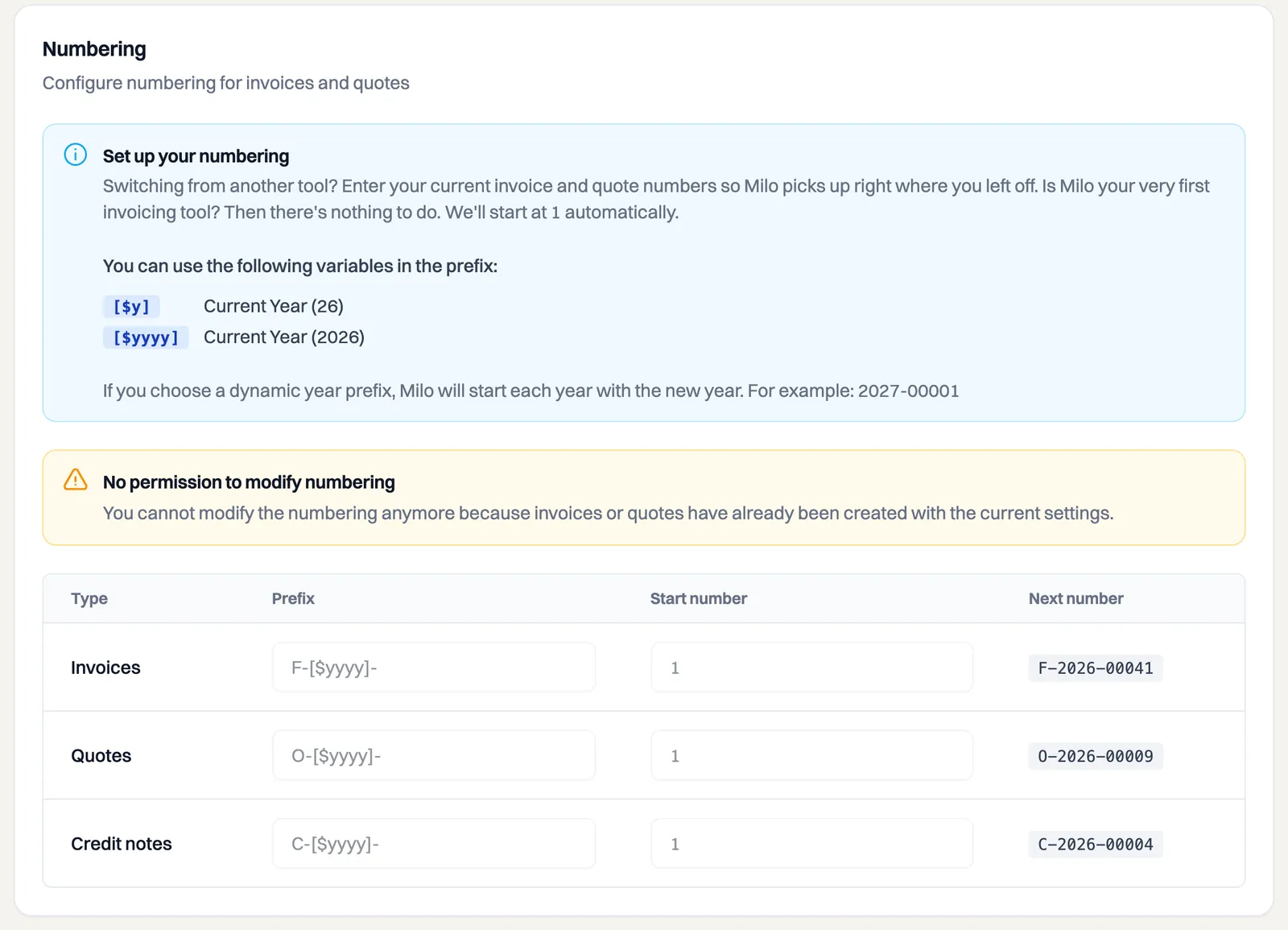
Go to Settings > General > Numbering. Each type of document has its own series with its own Prefix and Start number:
- invoices,
F-by default; - quotes,
O-by default; - credit notes,
C-by default.
Behind the prefix Milo puts a five-digit running number, so F-00001. Under Next number you see which number the next document of that type will get.
Moving over from another accounting package? Enter your current number as the start number so Milo carries on from there. Do it right away while setting up: as soon as documents of that type exist in your administration, the series is fixed and the prefix and start number can no longer be changed.
Starting over each year
The prefix can contain a variable for the year: [$y] for the short year and [$yyyy] for the full year. With F-[$yyyy]- you get numbers like F-2026-00001.
With such a variable in your prefix, the counter starts at 1 again in the new year. Milo looks at the year the last number was issued, not at when you created the document. An invoice you draw up in December but only send in January therefore belongs to January's series.
Three series side by side
Invoices, quotes and credit notes count independently of each other. Your first credit note is C-00001, even if you have already sent dozens of invoices. If you keep several administrations, each company has its own series on top of that.
When a document gets its number
- Sending it by e-mail: the document gets its number at that moment.
- Setting it to Pending yourself: if you sent an invoice outside Milo, on paper for instance, you set it to Pending with Change status. That counts as issuing it just as much, so the invoice gets its number then too.
- Converting a quote into an invoice: that produces a draft invoice, so it has no number yet. The quote's status log reads Converted to a draft invoice. The invoice number appears once you send that invoice.
- Recurring invoices: Milo sends those automatically, so they are numbered straight away.
- A preview of your house style: that is a sample PDF with fictitious details and consumes no number.
Deleting a draft
You can remove a draft without any consequence for your numbering. The confirmation shows Draft instead of a number, because the document does not have one yet. See the article on deleting a draft invoice or draft quote.
Still stuck? Ask Milo through the chat in the bottom right, or mail [email protected].