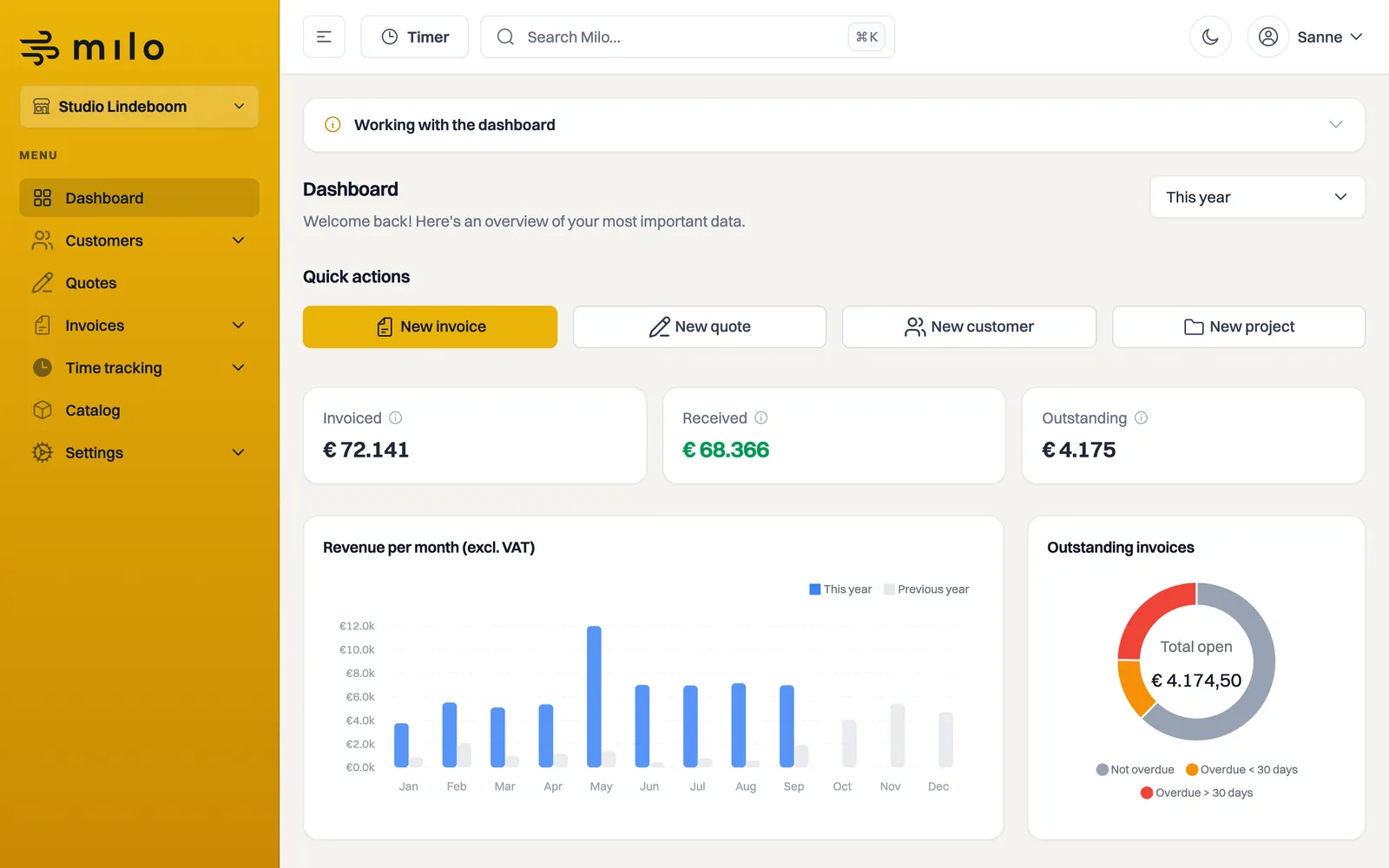
After signing in you land on the dashboard. This is your home page, with an overview of your most important figures, four charts and lists of what is still open.
Quick actions
Under Quick actions are four buttons that get you started right away: New invoice, New quote, New customer and New project. Each button opens the matching form directly.
Choosing the period
Top right there is a Period dropdown with This month, Last month, This quarter, This year and Custom. It defaults to This year. If you choose Custom, you set a start and end date yourself.
The period drives the three cards and all four charts. One exception: the Outstanding invoices chart shows what is outstanding in total today, regardless of the selected period. An outstanding invoice belongs to today rather than to a closed month.
The cards
Three cards show your figures, VAT included:
- Invoiced: everything you invoiced in the selected period, with credit notes subtracted.
- Received: what was actually paid to you in that period.
- Outstanding: what your customers still owe on outstanding invoices from that period.
Each card carries an explanation when you hover over it.
Charts
Below the cards are four charts:
- Revenue per month (excl. VAT): a bar chart comparing This year with Previous year. The comparison covers the same months, one year earlier.
- Outstanding invoices: splits the outstanding total into Not overdue, Overdue < 30 days and Overdue > 30 days. Exactly 30 days overdue falls in the last group.
- Top 5 customers by revenue (excl. VAT): who brought in the most in the selected period.
- Quote status: a ring with Open, Approved, Rejected and Expired, with your Conversion in the middle.
Conversion is the share of your decided quotes that were accepted. Decided means accepted, declined or expired; quotes that are still open do not count, because they have no outcome yet. The information icon next to the title explains that on screen as well.
If you have not invoiced yet, it says your charts will appear here once you start.
What is still open
Below the charts are four tabs with a count badge: Outstanding invoices, Draft invoices, Pending quotes and Draft quotes. Each tab shows the matching list, so you can go straight from the dashboard to whatever needs attention.
The counts follow the same definition as the lists themselves. Outstanding invoices therefore include overdue invoices, invoices with a reminder and invoices sent to collections, because none of those have been paid. Pending quotes include both sent quotes and quotes the customer has opened. The counts apply to the company you are working in.
Navigation and handy buttons
On the left is the main menu: Dashboard, Customers, Quotes, Invoices, Catalog, Time tracking and Settings. At the top you find the Timer button to quickly log time and a search field that finds customers, invoices, quotes, projects, catalog items and time entries. See the article on searching in Milo.
Still stuck? Ask Milo via the chat in the bottom right, or email [email protected].